Hi guys, in this article I want to discuss about scenario How to send message XML from third party system to SAP backend with RFC adapter receiver, SAP Cloud Connector and SAP CPI. This scenario use for in cases integration with SAP backend system by RFC connection. For clearly, kindly take a look this diagram

A. SAP Cloud Connection Configuration
Step 1 : Add mapping virtual to internal system
- Click Cloud to On-Premise
- Click Add
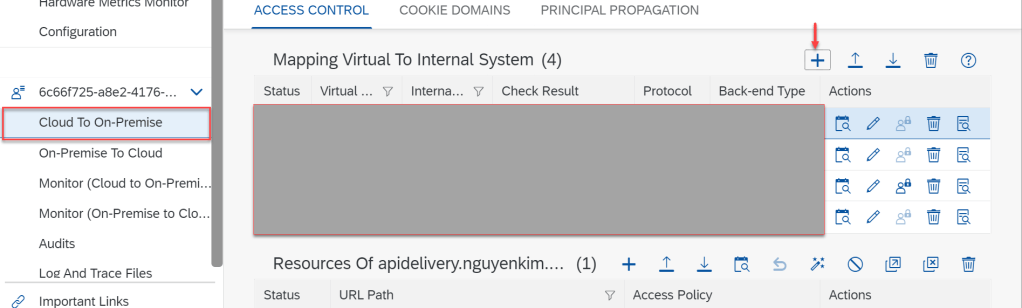
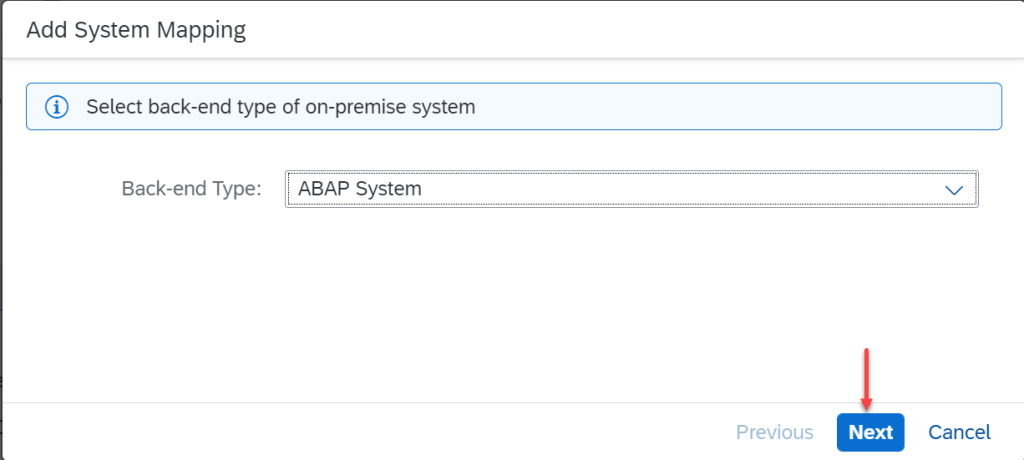
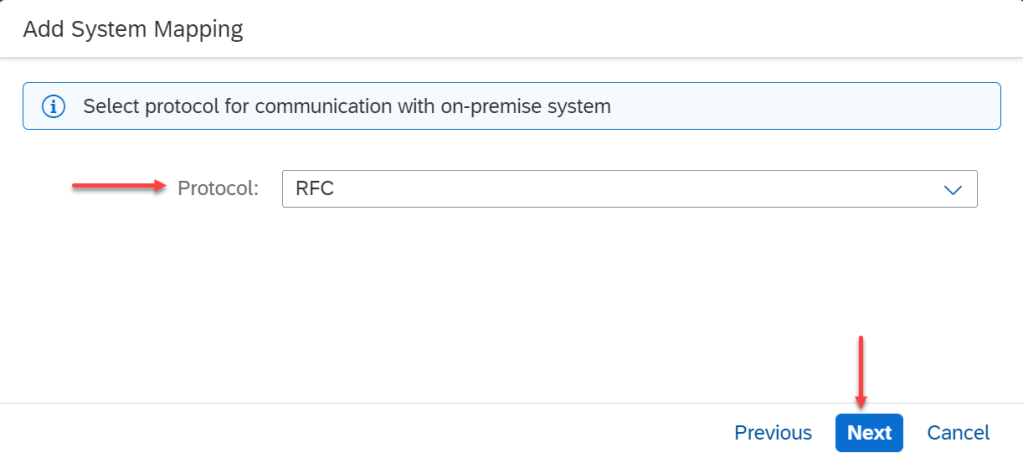
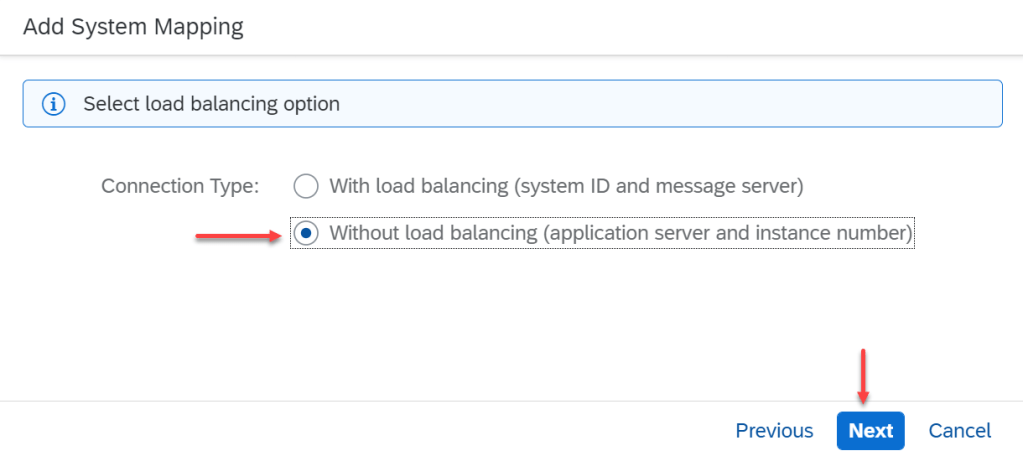
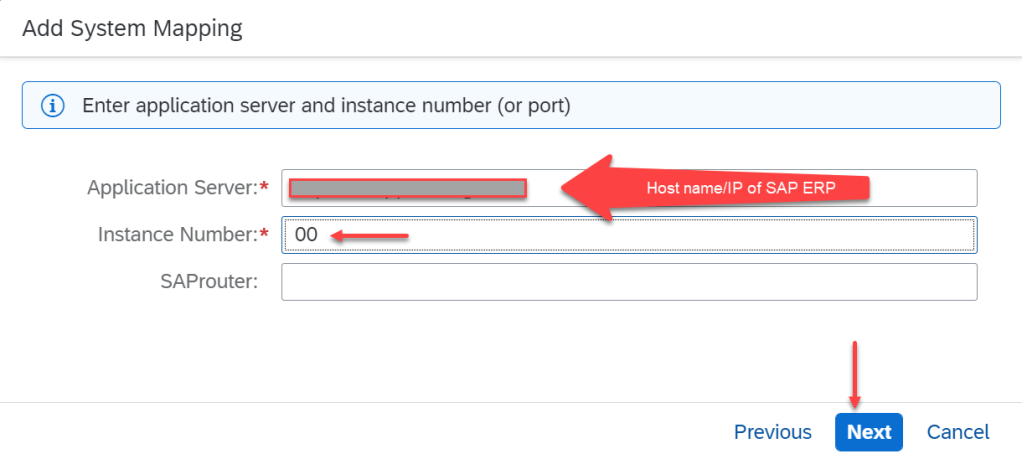

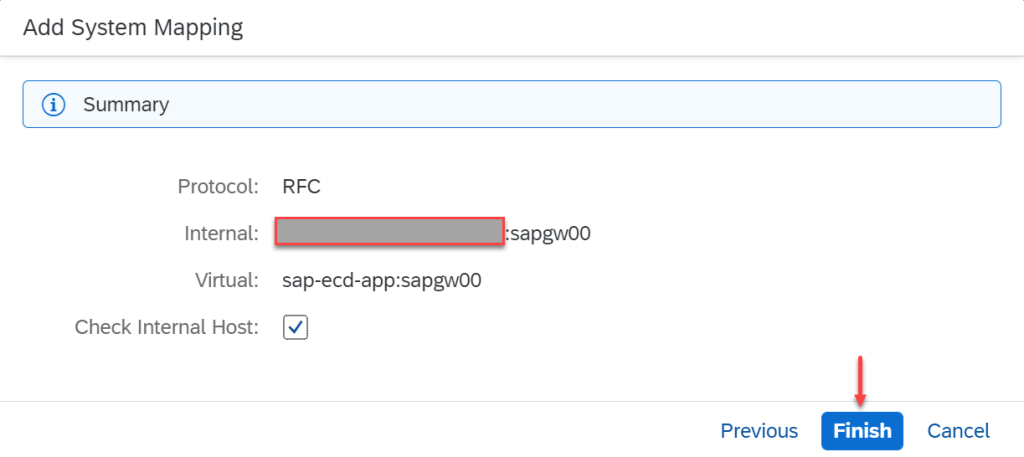
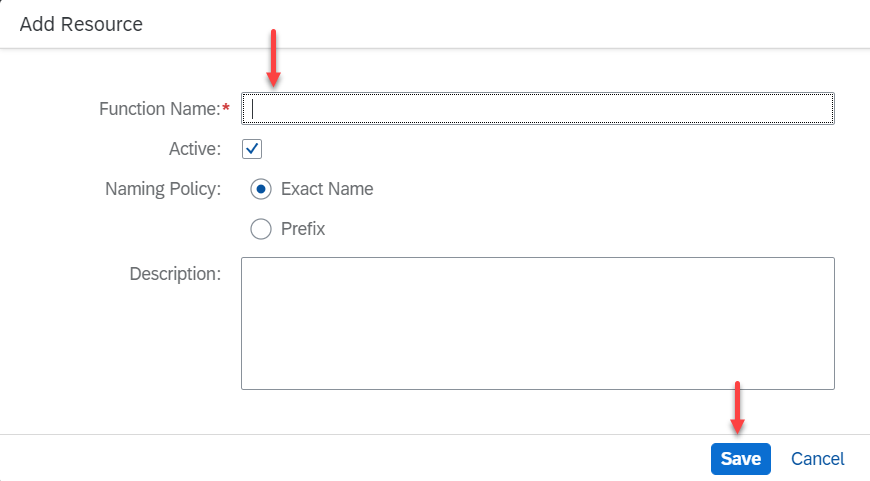
Step 2 : Add resource for this mapping. Choose function name on SAP backend
- Choose Virtual Host
- Click Add Resource (below)
- Enter function name (Function module or Webservice Define on SAP)
- If have many Function Name, we can add many times
If in integration flow, we check option Send Confirm Transaction, we have to add 2 following function name :
– BAPI_TRANSACTION_COMMIT
– BAPI_TRANSACTION_ROLLBACK
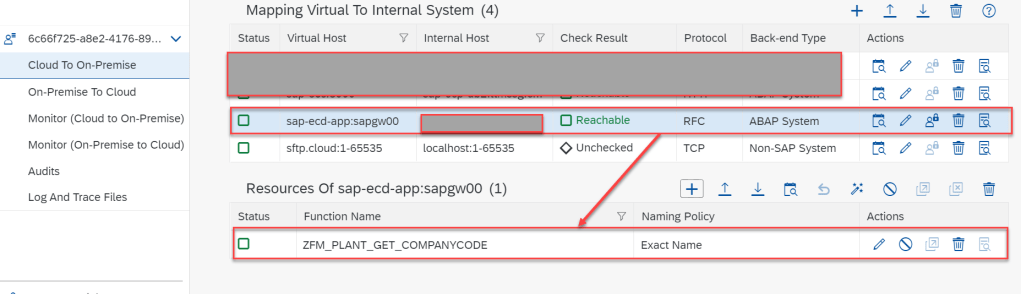
Everything will look as after done
B. SAP CPI Configuration
Step 1 : Add new destination
- Go to SAP BTP
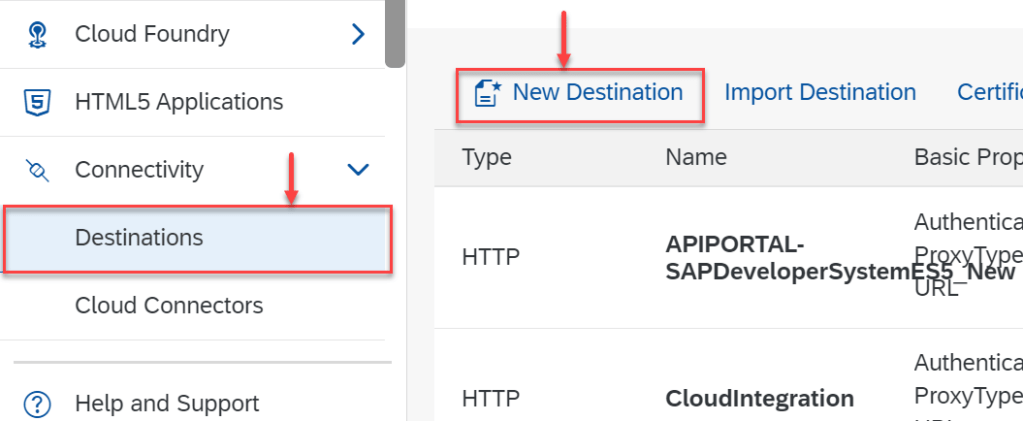
- Click Destinations on left side menu. Under Connectivity
- Click button New Destination
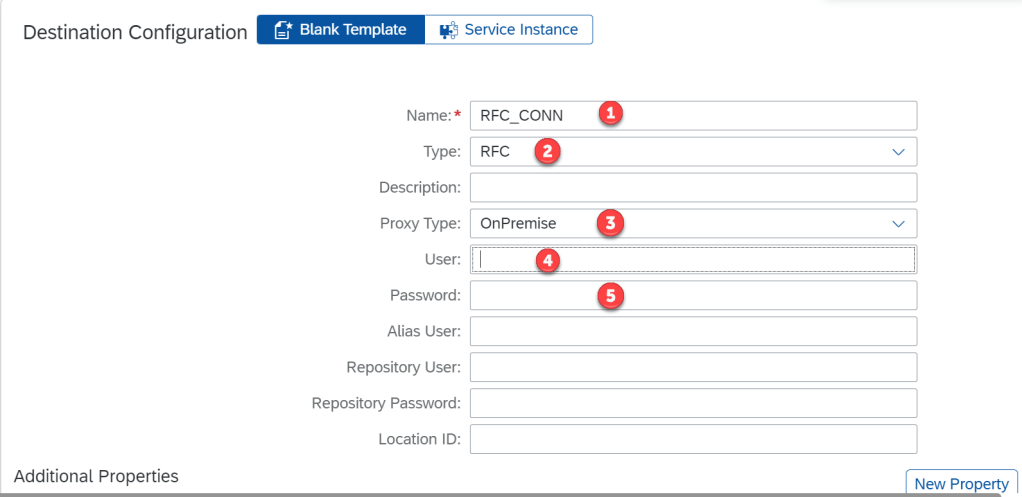
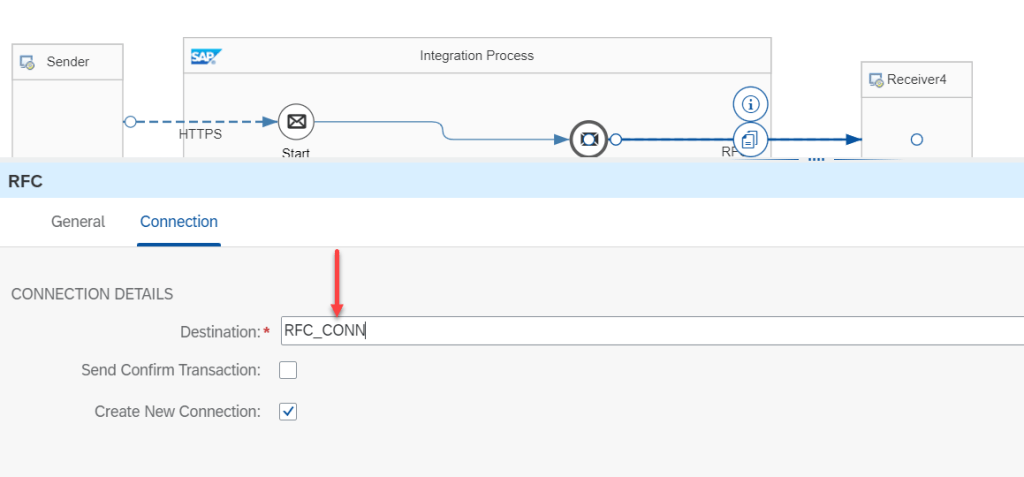
- (1) : Name. This Name will use as connection name in RFC receiver adapter of integration flow
- (2) : Type : RFC
- (3) : OnPremise
- (4)(5) : User / Pass of SAP ERP. This user must be take ROLE accordingly
Step 2 : Add property of destination
Now, we have to add some property of destination which create in step 1. Add following property
| jco.client.ashost | Virtual host on SCC |
| jco.client.client | Client of SAP ERP. EX : 190 |
| jco.client.lang | Language. Ex : EN |
| jco.client.sysnr | System number of SAP ERP. EX : 00 |
Step 3 : CPI integration flow design

C. Issues
Issue 1 : If body send request invalid structure XML of Function Module, we ‘ll receive this message.

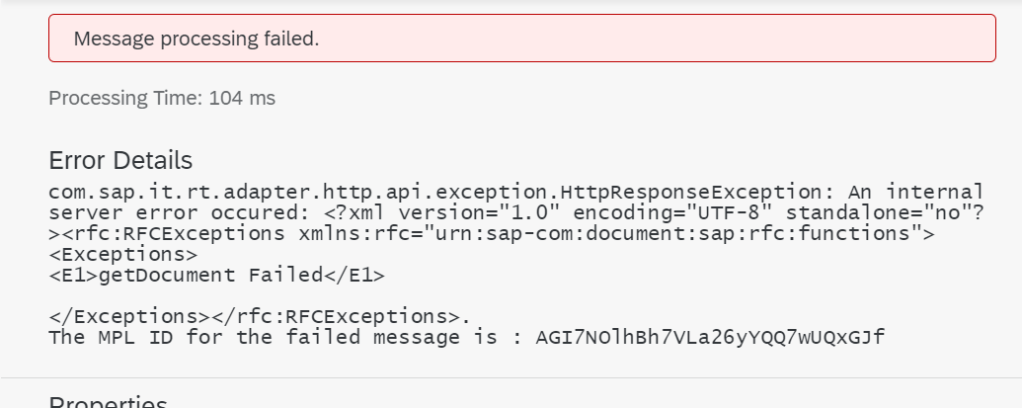
When take this issue, we have to check structure XML of Function Module and fix it.
D. Test case
For test purpose, we use standard function module : SXIDEMO_AIRL_FLIGHT_CHECKAVAIL
Structure XML of this function module as
<?xml version="1.0" encoding="UTF-8"?>
<ns0:SXIDEMO_AIRL_FLIGHT_CHECKAVAIL
	xmlns:ns0="urn:sap-com:document:sap:rfc:functions">
	<FLIGHT_KEY>
		<AIRLINEID/>
		<CONNECTID/>
		<FLIGHTDATE/>
	</FLIGHT_KEY>
</ns0:SXIDEMO_AIRL_FLIGHT_CHECKAVAIL>
Case 1 : No resource of this function module in SAP Cloud Connector
<?xml version="1.0" encoding="UTF-8" standalone="no"?>
<rfc:SXIDEMO_AIRL_FLIGHT_CHECKAVAIL.Exception
	xmlns:rfc="urn:sap-com:document:sap:rfc:functions">
	<Name>Partner signaled an error for conversation ID [69507688] : Access denied for SXIDEMO_AIRL_FLIGHT_CHECKAVAIL on sap-ecd-app:sapgw00. Expose the function module in your Cloud Connector in case it was a valid request.</Name>
	<Text>Partner signaled an error for conversation ID [69507688] : Access denied for SXIDEMO_AIRL_FLIGHT_CHECKAVAIL on sap-ecd-app:sapgw00. Expose the function module in your Cloud Connector in case it was a valid request.</Text>
	<Message>
		<ID/>
		<Number/>
	</Message>
	<Attributes></Attributes>
</rfc:SXIDEMO_AIRL_FLIGHT_CHECKAVAIL.Exception>
Case 2 : Invalid date
com.sap.it.rt.adapter.http.api.exception.HttpResponseException: An internal server error occured:
<?xml version="1.0" encoding="UTF-8" standalone="no"?>
<rfc:SXIDEMO_AIRL_FLIGHT_CHECKAVAIL.Exception
	xmlns:rfc="urn:sap-com:document:sap:rfc:functions">
	<Name>FLIGHT_NOT_FOUND</Name>
	<Text>FLIGHT_NOT_FOUND</Text>
	<Message>
		<ID>BC_IBF</ID>
		<Number>055</Number>
	</Message>
	<Attributes>
		<V1> 0000 20220202</V1>
	</Attributes>
</rfc:SXIDEMO_AIRL_FLIGHT_CHECKAVAIL.Exception>.
Case 3 : Invalid structure xml in Body request
com.sap.it.rt.adapter.http.api.exception.HttpResponseException: An internal server error occured: <?xml version="1.0" encoding="UTF-8" standalone="no"?><rfc:SXIDEMO_AIRL_FLIGHT_CHECKAVAILs.Exception xmlns:rfc="urn:sap-com:document:sap:rfc:functions"><Exceptions>
<E1>Error Getting Function</E1>

</Exceptions></rfc:SXIDEMO_AIRL_FLIGHT_CHECKAVAILs.Exception>.
The MPL ID for the failed message is : AGI7Xs4vl3zVENgi_6XYmcdoSr6E
Case 4 : OK
<?xml version="1.0" encoding="UTF-8"?>
<ns0:SXIDEMO_AIRL_FLIGHT_CHECKAVAIL
	xmlns:ns0="urn:sap-com:document:sap:rfc:functions">
	<FLIGHT_KEY>
		<AIRLINEID>LH</AIRLINEID>
		<CONNECTID>9981</CONNECTID>
		<FLIGHTDATE>20021221</FLIGHTDATE>
	</FLIGHT_KEY>
</ns0:SXIDEMO_AIRL_FLIGHT_CHECKAVAIL>
<?xml version="1.0" encoding="UTF-8" standalone="no"?>
<rfc:SXIDEMO_AIRL_FLIGHT_CHECKAVAIL.Response xmlns:rfc="urn:sap-com:document:sap:rfc:functions">
<FLIGHT_AVAILABILITY>
<ECONOMAX>320</ECONOMAX>
<ECONOFREE>308</ECONOFREE>
<BUSINMAX>20</BUSINMAX>
<BUSINFREE>19</BUSINFREE>
<FIRSTMAX>0</FIRSTMAX>
<FIRSTFREE>0</FIRSTFREE>
</FLIGHT_AVAILABILITY>
</rfc:SXIDEMO_AIRL_FLIGHT_CHECKAVAIL.Response>Summary
In this article, I discuss about RFC adapter receiver in SAP CPI. Thanks for your reading and have any question, kindly leave your comment in this below.
Thanks
Joseph.
 SAP Zero to Hero
Nice Blog, here i have a requirement that i need to integrate SAP CPI with S4HANA cloud through RFC
LikeLike
Nice Blog sir, Here i have a requirement to integrate SAP CPI with S4 HANA cloud through RFC (receiver)adapter, because i need to call function module in S4 HANA system. i don’t have any idea about these requirement because i’m new to SAP CPI , So Could you help us or provided some inputs to start my requirement .
LikeLike
Hello Sir,
I am a ABAP Developer. I want to sent some information through RFC from SAP ABAP to SAP CPI.
Here can i use as RFC adapter as sender in SAP CPI side to receive the data which sent through RFC function module from SAP ABAP side.
Could you please suggest what would be feasible solution from sending the data from sap abap side to SAP CPI. Thank you sir.
LikeLike
Hi Dilip Kumar
Sorry for my late to reply.
From SAP backend to CPI, there is no RFC Sender Adapter.
To send data from SAP backend to CPI via ABAP program, we can use XI sender adapter with scenario Outbound Proxy.
Hope this help you.
LikeLike
Very nice blog…Thanks for sharing it.
Well, Could you please also explain, how to expport the complete table data rathe than exporting data into a structure.
LikeLike