Hi buddies,
When we start work with SAP PO, we need create account and grant permission to users
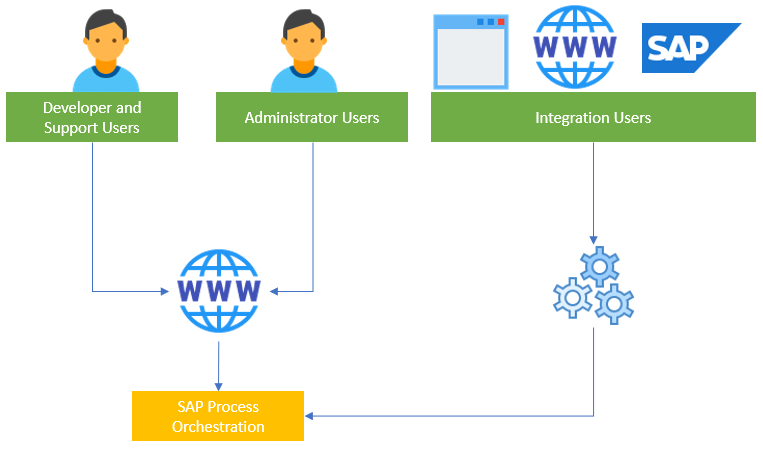
User roles can be:
1- SAP Process Orchestration Administrator role
2- SAP Process Orchestration Developer and Support role
3- Integration account
In this article, i will show you detail of roles you need consider when create user to access SAP Process Orchestration system. To reduce security risks.

1- Administrator roles
Administrator user roles allow SAP PO consultant manage SAP PO system, integration objects and system parameters setting.
| NWA_SUPERADMIN |
| SAP_SLD_CONFIGURATOR |
| SAP_XI_ADMINISTRATOR_J2EE |
| SAP_XI_ALERT_CONSUMER |
| SAP_XI_ALERTCONF_DISPLAY_J2EE |
| SAP_XI_APPL_SERV_USER |
| SAP_XI_CONFIGURATOR_EXT_J2EE |
| SAP_XI_CONFIGURATOR_J2EE |
| SAP_XI_DEVELOPER_J2EE |
| SAP_XI_DISPLAY_USER_J2EE |
| SAP_XI_ID_SERV_USER |
| SAP_XI_IR_SERV_USER |
| SAP_XI_IS_SERV_USER |
| SAP_XI_MESSAGE_MODIFY |
| SAP_XI_MONITOR_J2EE |
| SAP_XI_RWB_SERV_USER |
| SAP_XI_SUPPORT_J2EE |
| SAP_XI_BPE_ADMINISTRATOR_J2EE |
| SAP_XI_BPE_MONITOR_J2EE |
| SERVICES_REGISTRY_READ_ONLY |
| SAP_XI_API_DEVELOP_J2EE |
| SAP_XI_API_DISPLAY_J2EE |
| Administrator |
| pcd:portal_content/adminstrator/super_admin/super_admin_role |
| SAP_SLD_DEVELOPER |
| SAP_SLD_ADMINISTRATOR |
| SERVICES_REGISTRY_READ_WRITE |
| SAP_XI_CONTENT_ORGANIZER_J2EE |
| SAP_XI_CMS_SERV_USER |
| SAP_XI_CMS_SERV_USER UDDI_Admin |
2- Developer and Support roles
Developer user roles allow SAP PO Developer build integration objects
| NWA_READONLY |
| SAP_SLD_CONFIGURATOR |
| SAP_XI_ADMINISTRATOR_J2EE |
| SAP_XI_ALERT_CONSUMER |
| SAP_XI_ALERTCONF_DISPLAY_J2EE |
| SAP_XI_APPL_SERV_USER |
| SAP_XI_CONFIGURATOR_EXT_J2EE |
| SAP_XI_CONFIGURATOR_J2EE |
| SAP_XI_DEVELOPER_J2EE |
| SAP_XI_DISPLAY_USER_J2EE |
| SAP_XI_ID_SERV_USER |
| SAP_XI_IR_SERV_USER |
| SAP_XI_IS_SERV_USER |
| SAP_XI_MESSAGE_MODIFY |
| SAP_XI_MONITOR_J2EE |
| SAP_XI_RWB_SERV_USER |
| SAP_XI_SUPPORT_J2EE |
| SAP_XI_BPE_ADMINISTRATOR_J2EE |
| SAP_XI_BPE_MONITOR_J2EE |
| SERVICES_REGISTRY_READ_ONLY |
| SAP_XI_API_DEVELOP_J2EE |
| SAP_XI_API_DISPLAY_J2EE |
| SAP_XI_CMS_SERV_USER |
3- Integration account roles
Integration account use used for legacy system call SAP PO API like SOAP | REST Webservices
| SAP_XI_ID_SERV_USER |
| SAP_XI_IR_SERV_USER |
| SAP_XI_IS_SERV_USER |
| SAP_XI_RWB_SERV_USER |
Grant permission step by step
Step 01: Access SAP PO Server and User Management
Access your PO Server: http://hostname:port/startPage then select “User Management“

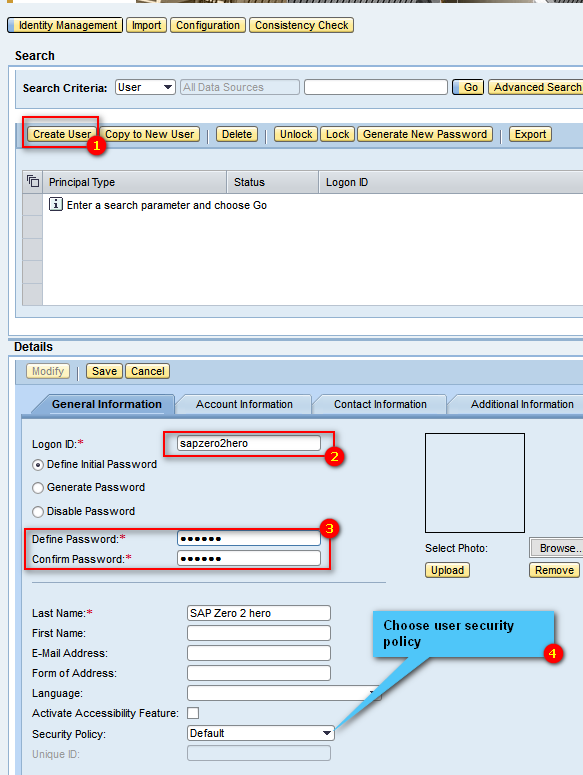
Step 02: Create new user account
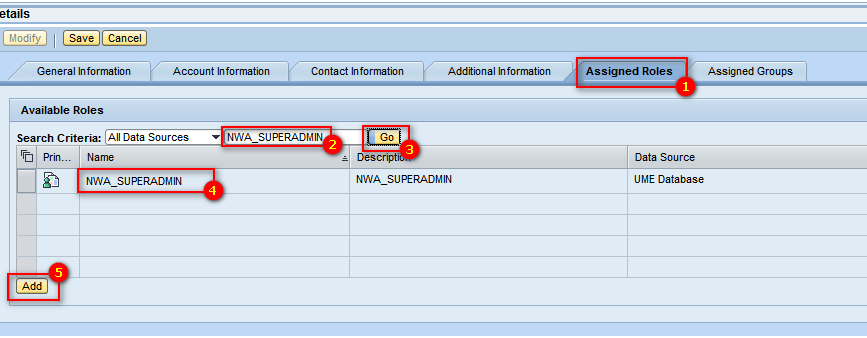
Step 03– Grant permission
Thanks for your attention
Cuong Dang
 SAP Zero to Hero
One comment